> ## Documentation Index
> Fetch the complete documentation index at: https://talktohumans.app/docs/llms.txt
> Use this file to discover all available pages before exploring further.
# 🛡️ Safety quotas
LinkedIn does not publish a universal number of actions that is safe for every account.
Instead of letting a busy day, a running sequence, or several teammates quietly push an account too far, **TalkToHumans applies strict daily quotas to the LinkedIn activity it performs.**
When a quota is reached, TalkToHumans pauses that specific type of action until the quota resets.
## See what you have left today
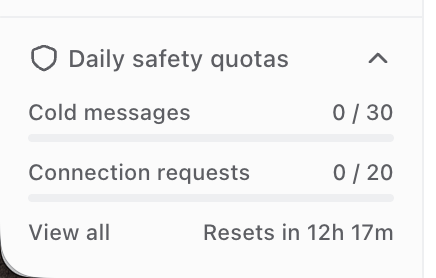
Open **Daily safety quotas** at the bottom of the sidebar.
The preview shows the two limits most likely to affect daily outreach:
* **Cold messages**
* **Connection requests**
 Click **View all**, or open **Analytics → Account health**, to see every quota for the current LinkedIn account.
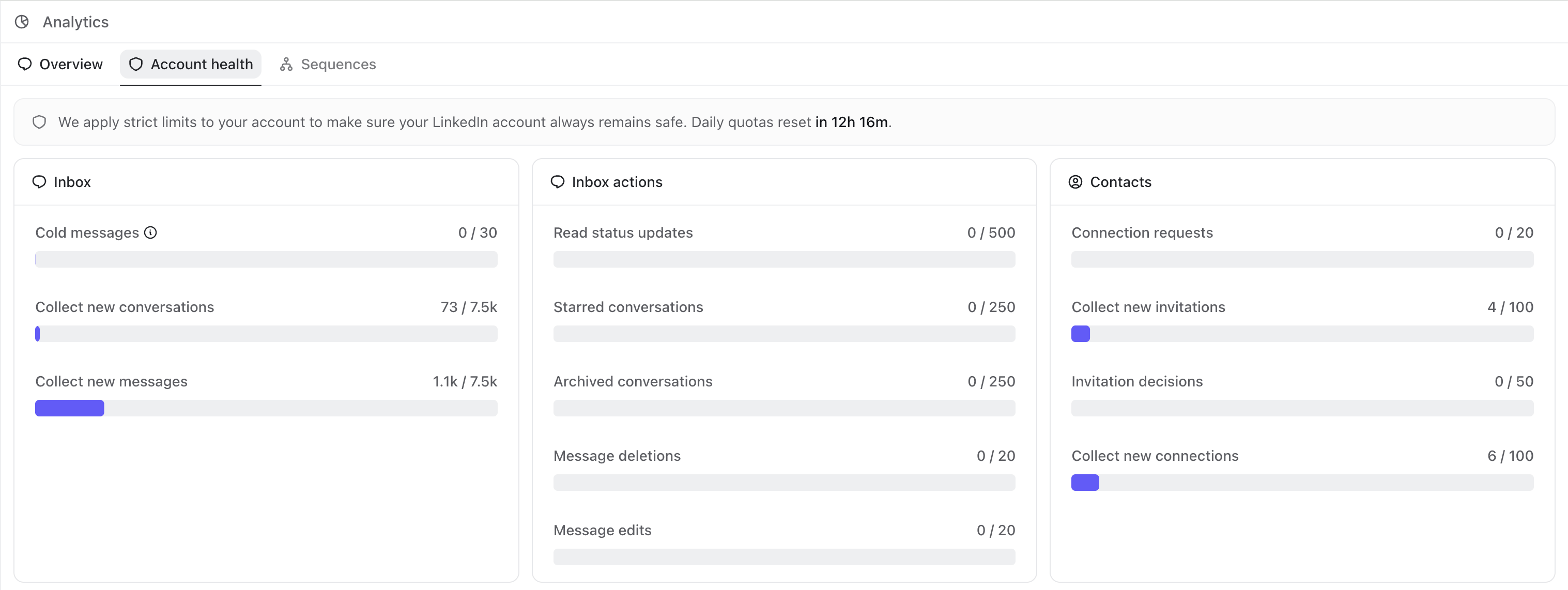
The full view separates them into three groups:
* **Inbox:** cold messages and the background activity used to collect conversations and messages
* **Inbox actions:** read status updates, starring, archiving, editing, and deleting messages
* **Contacts:** connection requests, invitation decisions, and the background activity used to collect invitations and connections
Click **View all**, or open **Analytics → Account health**, to see every quota for the current LinkedIn account.
The full view separates them into three groups:
* **Inbox:** cold messages and the background activity used to collect conversations and messages
* **Inbox actions:** read status updates, starring, archiving, editing, and deleting messages
* **Contacts:** connection requests, invitation decisions, and the background activity used to collect invitations and connections
 ## The current daily quotas
| **Area** | **Action** | **Daily quota** |
| :---------------- | :------------------------ | --------------: |
| **Inbox** | Cold messages | **30** |
| **Inbox** | Collect new conversations | **7,500** |
| **Inbox** | Collect new messages | **7,500** |
| **Inbox actions** | Read status updates | **500** |
| **Inbox actions** | Starred conversations | **250** |
| **Inbox actions** | Archived conversations | **250** |
| **Inbox actions** | Message deletions | **20** |
| **Inbox actions** | Message edits | **20** |
| **Contacts** | Connection requests | **20** |
| **Contacts** | Collect new invitations | **100** |
| **Contacts** | Invitation decisions | **50** |
| **Contacts** | Collect new connections | **100** |
These counters track actions performed through TalkToHumans. Actions you take directly inside LinkedIn do not appear here, but they can still affect your account’s reputation and LinkedIn’s own limits.
## What counts as a cold message?
A cold message is a LinkedIn DM sent to someone who has never replied to you in that conversation.
That means:
* Your first DM to someone counts as one cold message.
* Another message sent before they reply counts too.
* Once they reply, your messages in that conversation no longer use the cold-message quota.
So reaching the cold-message quota does **not** stop you from replying to active conversations.
## Quotas are shared by everyone using the account
If [you share an inbox with multiple users](https://www.talktohumans.app/docs/product/use-cases/shared-inbox), every action they perform through TalkToHumans counts toward the same daily quotas.
If one teammate sends 18 connection requests, only 2 remain for everyone else using that account that day.
Adding teammates therefore does not increase how many actions can safely be performed from that LinkedIn account.
**Separate LinkedIn accounts have separate quotas.**
## When quotas reset
All safety quotas reset every day. You can see exactly when they will reset in the **Daily safety quotas** widget and on the **Account health** page.
## Can I increase a safety quota?
No. Safety quotas are fixed by TalkToHumans and cannot be raised from your settings.
That constraint is intentional. TalkToHumans is built for people whose LinkedIn account is too valuable to trade for a little more daily volume.
See [Why it’s safer](https://www.talktohumans.app/docs/product/safety) for the other parts of HumanGuard.
## The current daily quotas
| **Area** | **Action** | **Daily quota** |
| :---------------- | :------------------------ | --------------: |
| **Inbox** | Cold messages | **30** |
| **Inbox** | Collect new conversations | **7,500** |
| **Inbox** | Collect new messages | **7,500** |
| **Inbox actions** | Read status updates | **500** |
| **Inbox actions** | Starred conversations | **250** |
| **Inbox actions** | Archived conversations | **250** |
| **Inbox actions** | Message deletions | **20** |
| **Inbox actions** | Message edits | **20** |
| **Contacts** | Connection requests | **20** |
| **Contacts** | Collect new invitations | **100** |
| **Contacts** | Invitation decisions | **50** |
| **Contacts** | Collect new connections | **100** |
These counters track actions performed through TalkToHumans. Actions you take directly inside LinkedIn do not appear here, but they can still affect your account’s reputation and LinkedIn’s own limits.
## What counts as a cold message?
A cold message is a LinkedIn DM sent to someone who has never replied to you in that conversation.
That means:
* Your first DM to someone counts as one cold message.
* Another message sent before they reply counts too.
* Once they reply, your messages in that conversation no longer use the cold-message quota.
So reaching the cold-message quota does **not** stop you from replying to active conversations.
## Quotas are shared by everyone using the account
If [you share an inbox with multiple users](https://www.talktohumans.app/docs/product/use-cases/shared-inbox), every action they perform through TalkToHumans counts toward the same daily quotas.
If one teammate sends 18 connection requests, only 2 remain for everyone else using that account that day.
Adding teammates therefore does not increase how many actions can safely be performed from that LinkedIn account.
**Separate LinkedIn accounts have separate quotas.**
## When quotas reset
All safety quotas reset every day. You can see exactly when they will reset in the **Daily safety quotas** widget and on the **Account health** page.
## Can I increase a safety quota?
No. Safety quotas are fixed by TalkToHumans and cannot be raised from your settings.
That constraint is intentional. TalkToHumans is built for people whose LinkedIn account is too valuable to trade for a little more daily volume.
See [Why it’s safer](https://www.talktohumans.app/docs/product/safety) for the other parts of HumanGuard.