> ## Documentation Index
> Fetch the complete documentation index at: https://talktohumans.app/docs/llms.txt
> Use this file to discover all available pages before exploring further.
# ✉️ Run safe outreach
There are 100+ ways to run outreach, but with TalkToHumans, we decided to stick to the basics that simply work and won’t put your account or reputation at risk.
## 🙋♂️ Find relevant leads
### 1. Dig **into** your own network
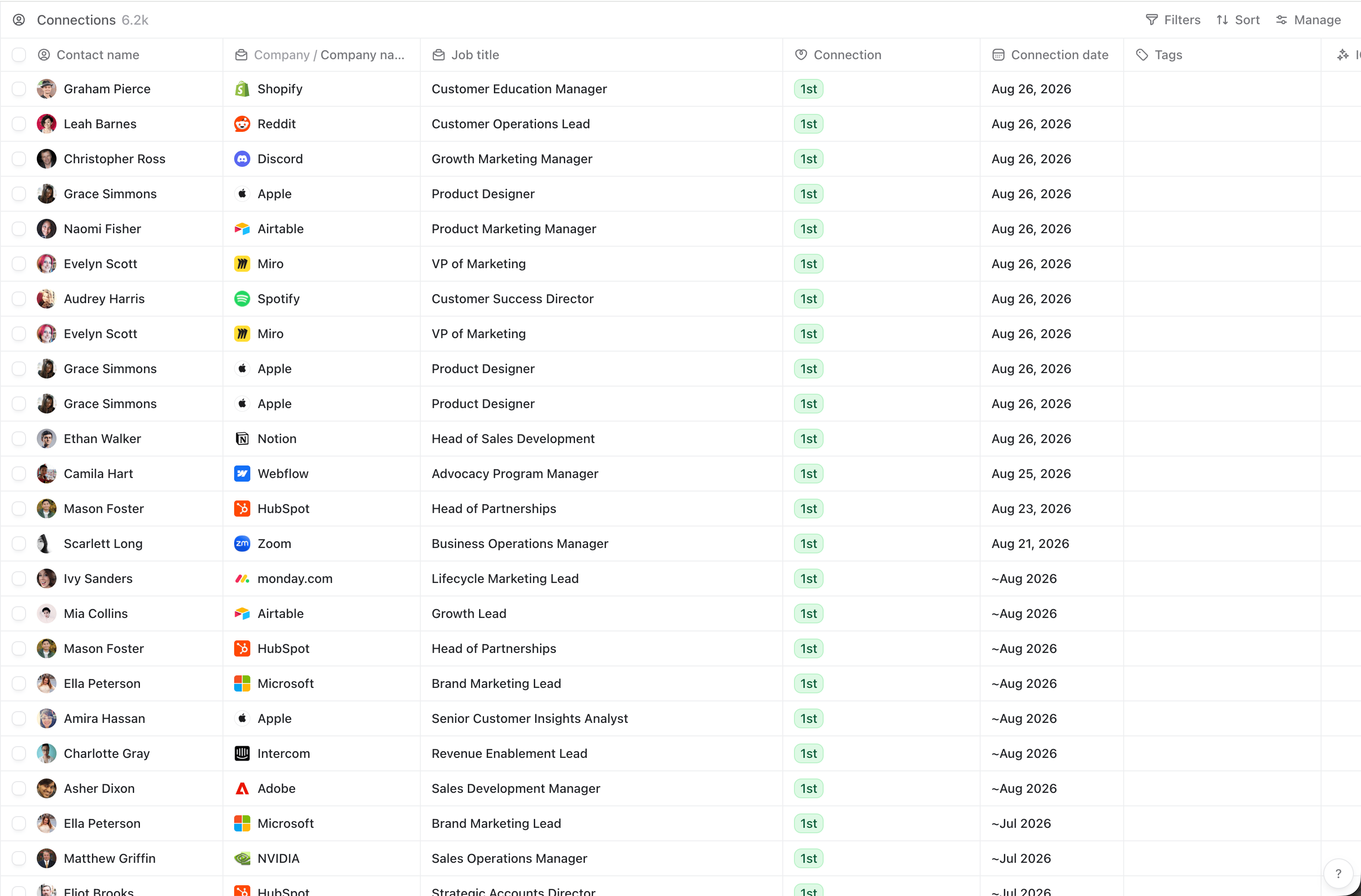 **This is the most underrated source that most people overlook:** you probably have at least 20 existing connections you could message **today** without sending a connection request.
The problem is that LinkedIn doesn’t make it easy to leverage your existing network, **but we do**:
You can [use our MCP to ask your favorite AI tool to find leads](https://www.talktohumans.app/docs/product/use-cases/ai-tools) matching your ICP within your network, and then build a dedicated list
### 2. Find new leads directly on LinkedIn
Here are some boring but very effective ways to find leads directly on LinkedIn:
#### Search relevant posts and reach out to engagers or authors
**This is the most underrated source that most people overlook:** you probably have at least 20 existing connections you could message **today** without sending a connection request.
The problem is that LinkedIn doesn’t make it easy to leverage your existing network, **but we do**:
You can [use our MCP to ask your favorite AI tool to find leads](https://www.talktohumans.app/docs/product/use-cases/ai-tools) matching your ICP within your network, and then build a dedicated list
### 2. Find new leads directly on LinkedIn
Here are some boring but very effective ways to find leads directly on LinkedIn:
#### Search relevant posts and reach out to engagers or authors
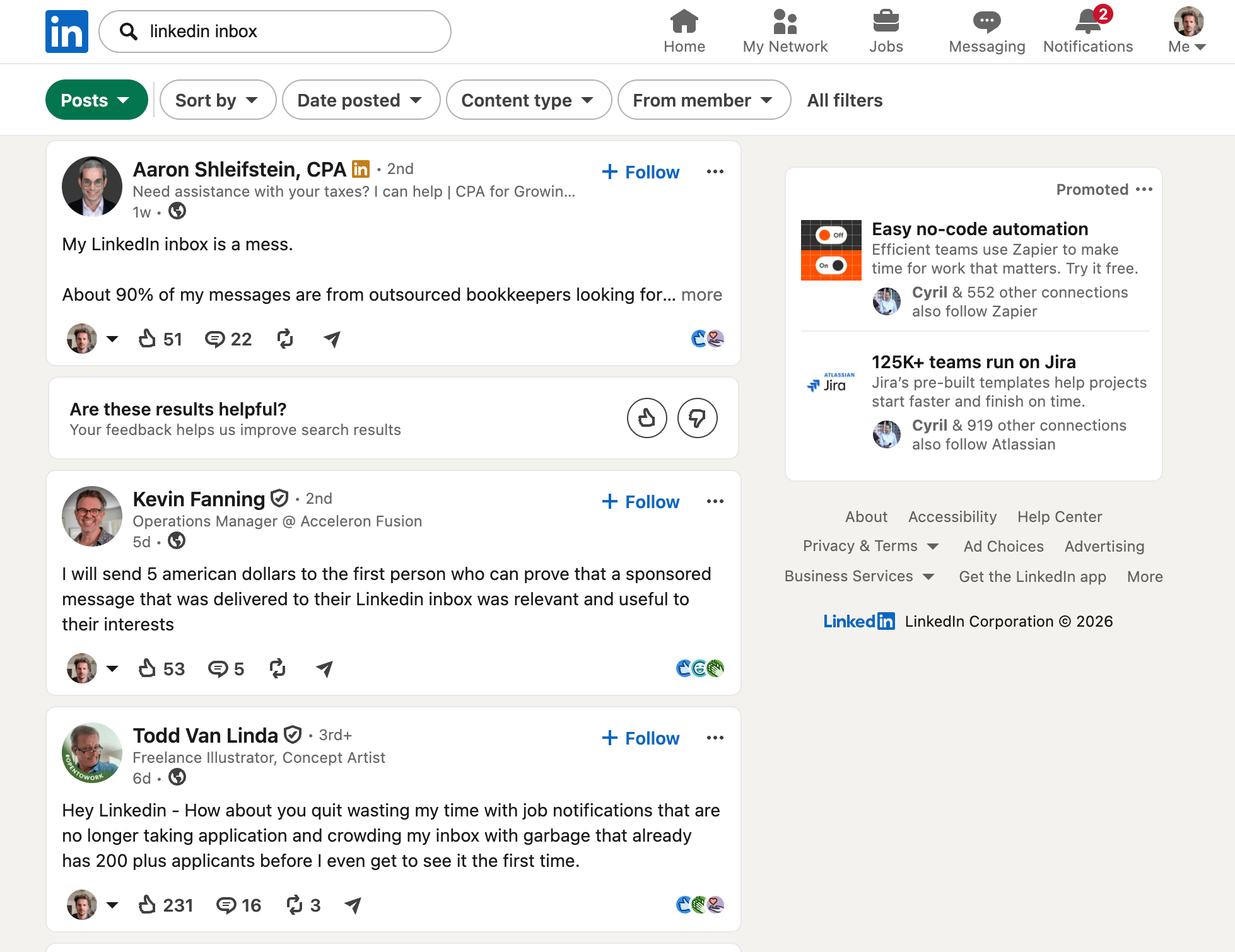 Search for keywords relevant to your problem space or competitor mentions.
The author might directly express a pain point or discuss solutions they’ve considered, or people might do so in the comments.
You can open their profiles, check if they fit your ICP, import them into TalkToHumans and start a personalized sequence using the [smart embed](https://www.talktohumans.app/docs/product/contacts/import).
The advantage here: these leads give you a natural opening.
#### Use Sales Navigator and build lists
Search for keywords relevant to your problem space or competitor mentions.
The author might directly express a pain point or discuss solutions they’ve considered, or people might do so in the comments.
You can open their profiles, check if they fit your ICP, import them into TalkToHumans and start a personalized sequence using the [smart embed](https://www.talktohumans.app/docs/product/contacts/import).
The advantage here: these leads give you a natural opening.
#### Use Sales Navigator and build lists
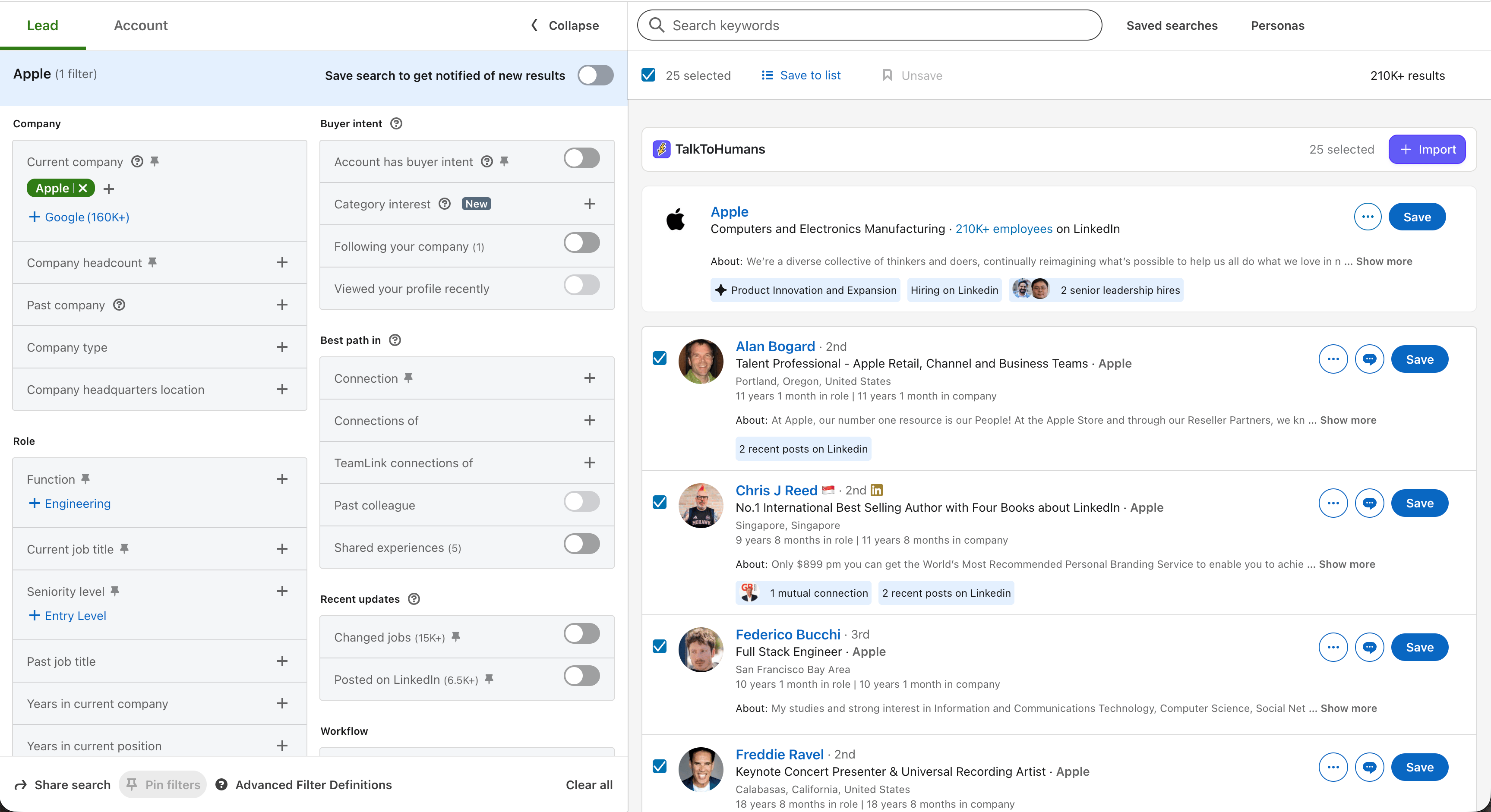 If you have a Sales Navigator subscription, you can filter specific segments and import them into TalkToHumans, in one click.
### 3. Ask Claude or Codex for daily leads
Using the [TalkToHumans MCP](https://www.talktohumans.app/docs/developers/mcp) and a tool like [Parallel Search](https://parallel.ai/), you can prompt your favorite AI tool to find you relevant leads every day:
```text theme={null}
Use ParallelSearch MCP to find 20 high-quality leads I should reach out to today for BUSINESS_NAME.
My ICP:
DESCRIBE YOUR ICP
Prioritize leads who have recently shown direct or indirect buying intent online, such as engaging with relevant topics, discussing a problem we solve, interacting with competitors, or showing other relevant intent signals.
Once you’ve identified the best 20 leads:
1. Make sure none are duplicates or already exist in TalkToHumans.
2. Import the new leads using TalkToHumans MCP.
3. Create a dedicated view for these leads so I can start working through them today.
```
### 4. Import or find leads from elsewhere
If you have or need a more advanced GTM stack, you can easily push leads into TalkToHumans.
Whether they come from your CRM, Clay, or a list you've built in Google Sheets, you can import them using our [MCP](https://www.talktohumans.app/docs/developers/mcp#mcp-tools-available) or [API](https://www.talktohumans.app/docs/developers/contacts/import-contact).
Pro tip: if you have more advanced needs, like scoring every contact based on how well they match your ICP, you can do that by creating a [custom field](https://www.talktohumans.app/docs/product/contacts/custom-fields) called "ICP score", then use our [MCP](https://www.talktohumans.app/docs/developers/mcp) to ask your favorite AI tool to score your contacts and update this field.
You can then sort your contact views by this score to better prioritize leads.
## Start conversations
With TalkToHumans, reaching out in a personal and relevant way is easy.
There are no campaigns here. TalkToHumans is built so **you approach every lead with a personalized sequence designed specifically for them.**
Using [contact views](https://www.talktohumans.app/docs/product/contacts/views), you can move from one conversation to the next with [keyboard shortcuts ](https://www.talktohumans.app/docs/product/shortcuts)like `J` and `K`, then press `Enter` to open the chat panel:
If you have a Sales Navigator subscription, you can filter specific segments and import them into TalkToHumans, in one click.
### 3. Ask Claude or Codex for daily leads
Using the [TalkToHumans MCP](https://www.talktohumans.app/docs/developers/mcp) and a tool like [Parallel Search](https://parallel.ai/), you can prompt your favorite AI tool to find you relevant leads every day:
```text theme={null}
Use ParallelSearch MCP to find 20 high-quality leads I should reach out to today for BUSINESS_NAME.
My ICP:
DESCRIBE YOUR ICP
Prioritize leads who have recently shown direct or indirect buying intent online, such as engaging with relevant topics, discussing a problem we solve, interacting with competitors, or showing other relevant intent signals.
Once you’ve identified the best 20 leads:
1. Make sure none are duplicates or already exist in TalkToHumans.
2. Import the new leads using TalkToHumans MCP.
3. Create a dedicated view for these leads so I can start working through them today.
```
### 4. Import or find leads from elsewhere
If you have or need a more advanced GTM stack, you can easily push leads into TalkToHumans.
Whether they come from your CRM, Clay, or a list you've built in Google Sheets, you can import them using our [MCP](https://www.talktohumans.app/docs/developers/mcp#mcp-tools-available) or [API](https://www.talktohumans.app/docs/developers/contacts/import-contact).
Pro tip: if you have more advanced needs, like scoring every contact based on how well they match your ICP, you can do that by creating a [custom field](https://www.talktohumans.app/docs/product/contacts/custom-fields) called "ICP score", then use our [MCP](https://www.talktohumans.app/docs/developers/mcp) to ask your favorite AI tool to score your contacts and update this field.
You can then sort your contact views by this score to better prioritize leads.
## Start conversations
With TalkToHumans, reaching out in a personal and relevant way is easy.
There are no campaigns here. TalkToHumans is built so **you approach every lead with a personalized sequence designed specifically for them.**
Using [contact views](https://www.talktohumans.app/docs/product/contacts/views), you can move from one conversation to the next with [keyboard shortcuts ](https://www.talktohumans.app/docs/product/shortcuts)like `J` and `K`, then press `Enter` to open the chat panel:
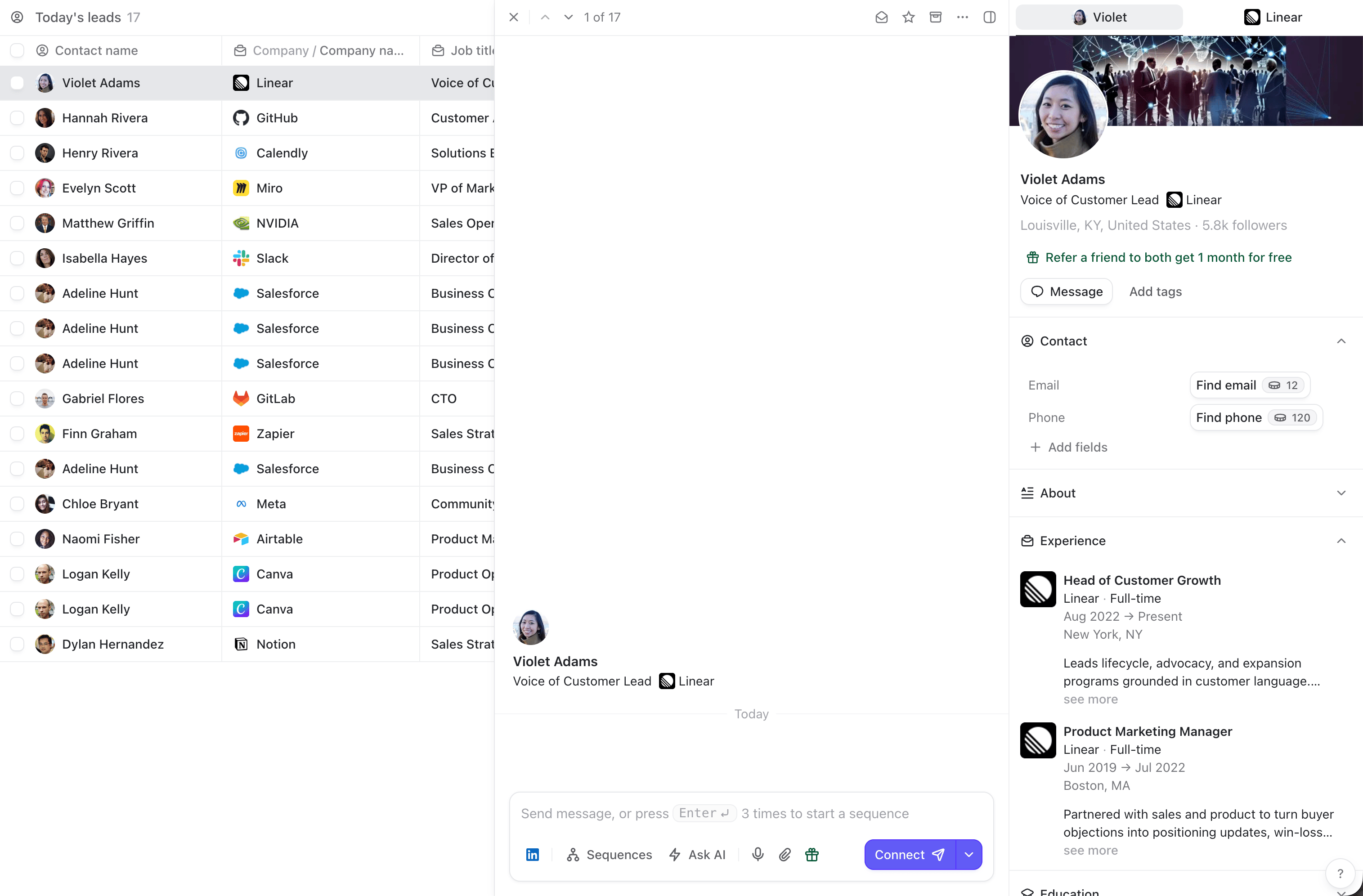 From there, press `Enter` once to focus the composer, then press `Enter` 3x to start a personalized sequence:
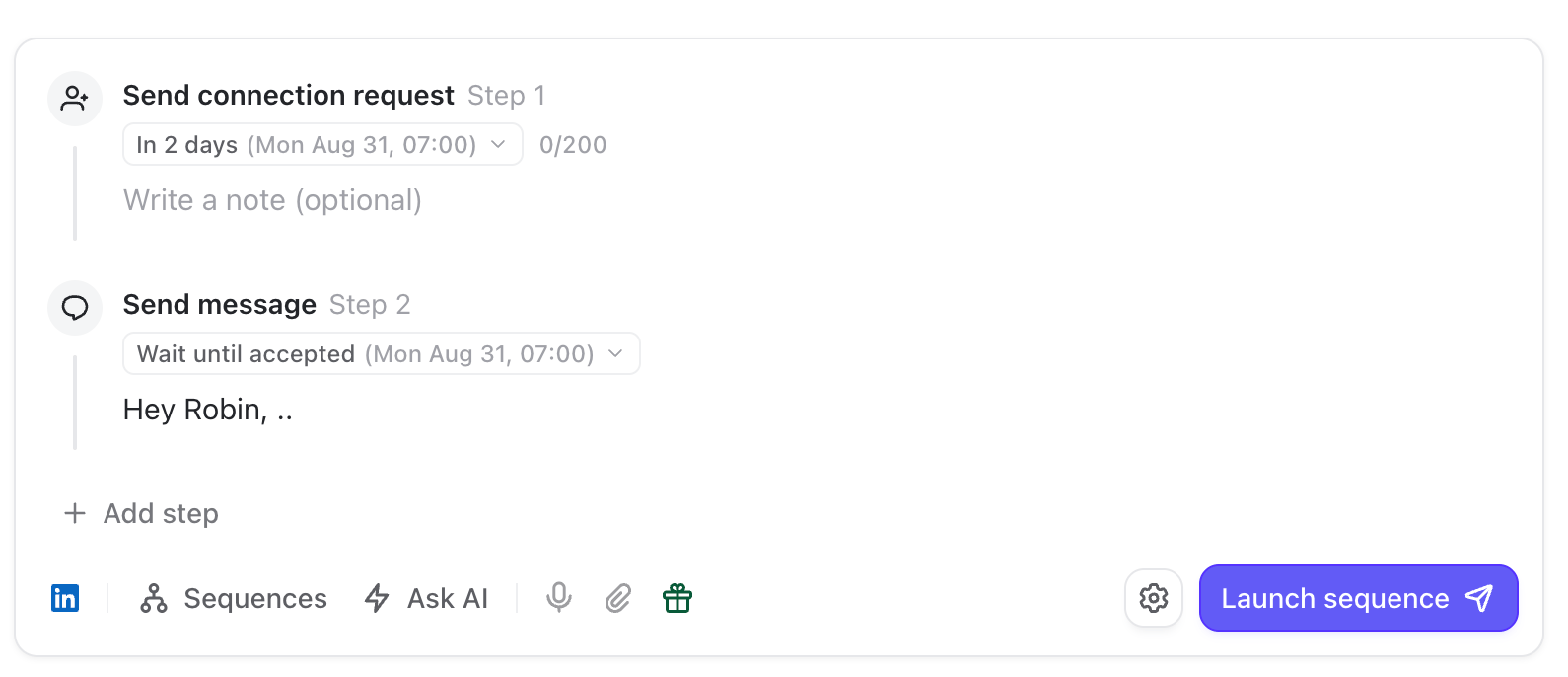 For the actual writing, that’s a skill of its own, but **here are a few rules of thumb:**
* Keep messages short, max 3 sentences
* Absolutely avoid pitch-slapping in the first message
* Make it ultra-relevant to this specific person using the context provided in the sidebar
* Simply ask yourself: “Would I reply to this message if I were the recipient?” If not, iterate.
Once your sequence is ready, launch it by pressing `CMD` + `Enter`
Then press `Esc` to unfocus the chat and `J` to move to the next contact. **Rinse and repeat.**
If you find yourself reusing the same sequence patterns often, you can create a [dedicated template](https://www.talktohumans.app/docs/product/messaging/templates) for them:
For the actual writing, that’s a skill of its own, but **here are a few rules of thumb:**
* Keep messages short, max 3 sentences
* Absolutely avoid pitch-slapping in the first message
* Make it ultra-relevant to this specific person using the context provided in the sidebar
* Simply ask yourself: “Would I reply to this message if I were the recipient?” If not, iterate.
Once your sequence is ready, launch it by pressing `CMD` + `Enter`
Then press `Esc` to unfocus the chat and `J` to move to the next contact. **Rinse and repeat.**
If you find yourself reusing the same sequence patterns often, you can create a [dedicated template](https://www.talktohumans.app/docs/product/messaging/templates) for them:
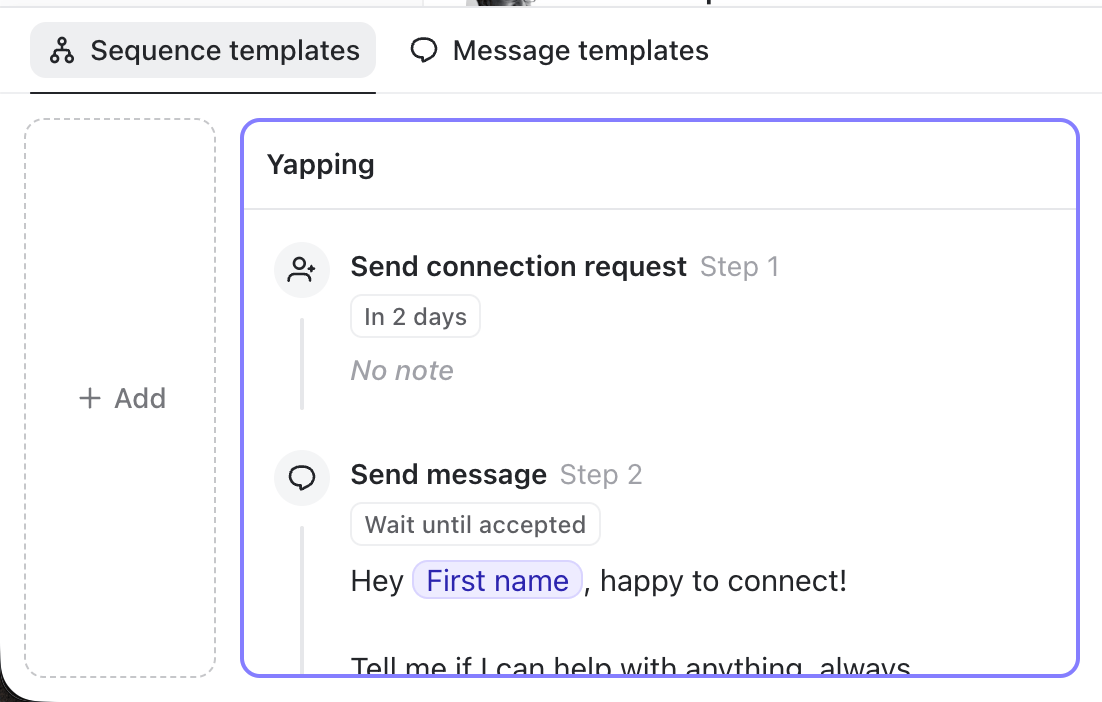 Just make sure to tweak it **heavily** so it stays **highly relevant** and doesn’t sound generic before launching it!
### Still having no idea what to write?
A surprisingly effective approach is to **“just yap all day.”** Simply tell people you’re happy to connect, that you’re always happy to share your experience, then ask how their week is going.
Trust us: **you’ll naturally stand out**, because today many people receive nothing but AI-generated pitch-slapping messages.
We’re also writing a complete “what works best” outbound guide covering everything we’ve learned. We’ll link it here once it’s finished.
In any case, the best advice is to **experiment** **with different approaches** every week.
To review what works and what doesn't, you can use our [MCP](https://www.talktohumans.app/docs/developers/mcp) and ask your favorite AI tool to analyze your past week’s conversations.
## Manage conversations
If you’ve done much outbound, you know that **getting a reply is rarely the finish line.**
Very often you have to pre-qualify leads, go for the meeting, but most importantly: you very often need to keep the conversation warm because they don't reply back.
This is exactly where TalkToHumans shines: you can schedule "on-the-go" [follow-ups](https://www.talktohumans.app/docs/product/messaging/follow-ups) **after** you get the initial reply, where many deals are actually buried.
See [**Manage replies**](https://www.talktohumans.app/docs/product/inbox) for more details.
Just make sure to tweak it **heavily** so it stays **highly relevant** and doesn’t sound generic before launching it!
### Still having no idea what to write?
A surprisingly effective approach is to **“just yap all day.”** Simply tell people you’re happy to connect, that you’re always happy to share your experience, then ask how their week is going.
Trust us: **you’ll naturally stand out**, because today many people receive nothing but AI-generated pitch-slapping messages.
We’re also writing a complete “what works best” outbound guide covering everything we’ve learned. We’ll link it here once it’s finished.
In any case, the best advice is to **experiment** **with different approaches** every week.
To review what works and what doesn't, you can use our [MCP](https://www.talktohumans.app/docs/developers/mcp) and ask your favorite AI tool to analyze your past week’s conversations.
## Manage conversations
If you’ve done much outbound, you know that **getting a reply is rarely the finish line.**
Very often you have to pre-qualify leads, go for the meeting, but most importantly: you very often need to keep the conversation warm because they don't reply back.
This is exactly where TalkToHumans shines: you can schedule "on-the-go" [follow-ups](https://www.talktohumans.app/docs/product/messaging/follow-ups) **after** you get the initial reply, where many deals are actually buried.
See [**Manage replies**](https://www.talktohumans.app/docs/product/inbox) for more details.